Your clicks cost more than they should, or your ads sit low on the page even though you raised bids. When you finally add the Quality Score column, half your keywords show a 3 or a 4. Now you want to know what that number means, whether it matters, and how to move it.
Quality Score is a 1 to 10 rating Google gives each keyword. It summarizes three things: how likely people are to click your ad, how closely the ad matches the search, and how useful your landing page is. Google compares you against other advertisers who showed for the same search over the last 90 days.
Here's the part many guides skip. Google's help explains that the auction doesn't read your Quality Score number at all; the score is a diagnostic that summarizes the live quality signals the auction does use. So you don't chase the number. You use it to find which of the three parts needs work, and then you fix the ads, keywords or pages behind it.
Quick answer
- Go to Campaigns > Audiences, keywords, and content > Keywords, click Columns and add Quality Score, Exp. CTR, Ad relevance and Landing page exp. from the Quality score group.
- Sort by cost and focus on keywords that spend the most and score lowest.
- For each one, find which of the three parts says Below average.
- Expected CTR low: write more specific, compelling headlines that use the searcher's words.
- Ad relevance low: split the ad group into tighter themes so each ad matches its keywords.
- Landing page experience low: send people to the page that matches the search, and make it fast and mobile-friendly.
Before you start
Gather a few things before you start changing ads or pages.
- Access: Standard or Admin access to Google Ads.
- Enough data: Quality Score needs exact searches of your keyword. A dash (—) in the column means there isn't enough data yet.
- Access to your website or landing pages: Or someone who can change them. Landing page fixes often need a developer.
- Time: About an hour to review and plan, then a few weeks to see changes.
Export your current keyword table with the Quality Score columns before you change anything. You'll want a baseline to compare against later.
Step 1: Add the Quality Score columns
Click Campaigns in the left menu, open Audiences, keywords, and content and click Keywords. Above the table, click Columns. A panel called Modify columns for keywords opens.
Expand the Quality score group and check these columns:
- Quality Score
- Exp. CTR (expected clickthrough rate)
- Ad relevance
- Landing page exp. (landing page experience)
The same group has historical versions of each one: Quality Score (hist.), Exp. CTR (hist.), Landing page exp. (hist.) and Ad relevance (hist.). Google's help says these show past values for your date range. Segment by day to watch how scores change after your fixes.
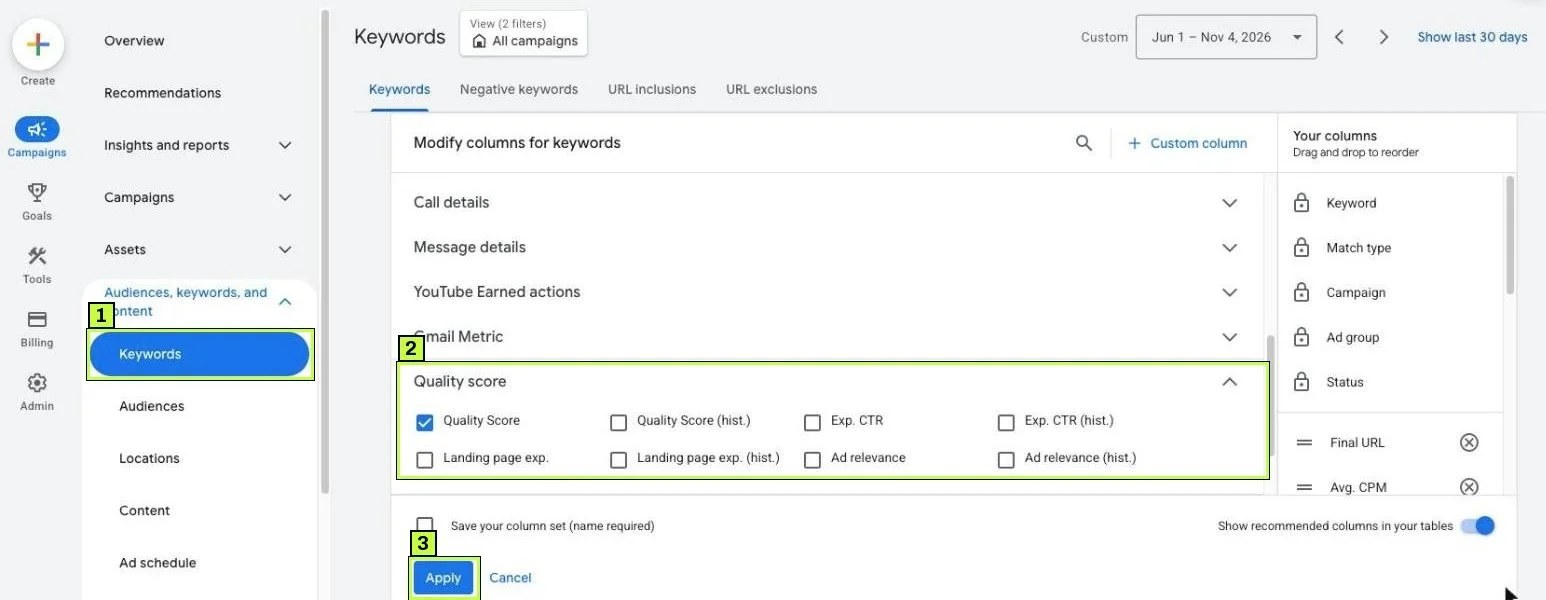
Click Apply. The scores show only for Search keywords, because Performance Max and Display campaigns don't report them. To keep this view, check Save your column set at the bottom of the panel and give it a name.
Step 2: Find the keywords worth fixing
Don't try to fix every keyword at once. Sort the table by Cost, highest first, because the keywords at the top are where a better score saves the most money.
Look for this pattern: high cost, Quality Score of 5 or below, and at least one component marked Below average. Those are your priorities for the next few weeks.
Also read the Status column. A keyword can show Eligible (Limited) with the reason Rarely shown (low Quality Score). That's Google telling you the keyword seldom gets into auctions because of its quality, which makes it a top candidate for this guide.
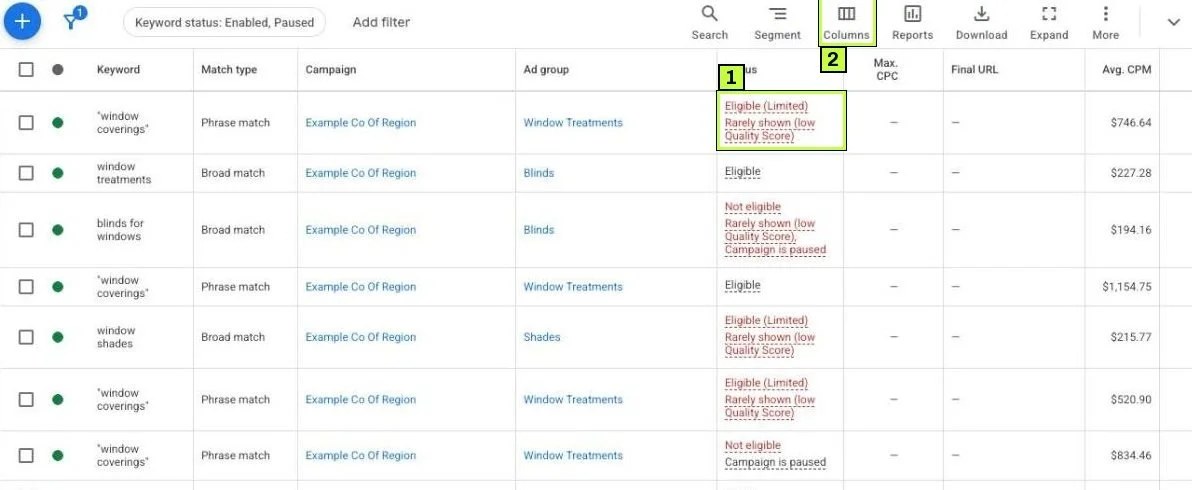
Each component has one of three ratings:
| Rating | What it means |
|---|---|
| Above average | Better than most advertisers for this search. Leave it. |
| Average | Similar to others. Improve if it's a high-spend keyword. |
| Below average | Worse than most. This is what to fix. |
A keyword with a score of 4 and Below average on landing page experience needs a page fix, not new ad copy. A keyword with Below average ad relevance needs restructuring, so the component tells you exactly where to work.
Here's a made-up example of what to look for once the columns are in place:
| Keyword | QS | Exp. CTR | Ad relevance | Landing page exp. | What to fix |
|---|---|---|---|---|---|
| Keyword A | 8 | Above average | Above average | Average | Nothing urgent. |
| Keyword B | 4 | Average | Below average | Below average | Ad group structure and the landing page. |
| Keyword C | 3 | Below average | Average | Below average | Headlines and the landing page. |
Step 3: Fix low expected CTR
Expected CTR is Google's prediction of how likely your ad is to get a click when it shows for that keyword. Google factors out ad position and other visibility effects, so the rating is about the ad itself.
How to raise it:
- Put the keyword idea in the first headline. If someone searches "water heater repair", a headline saying "Water Heater Repair Today" gets noticed.
- Give a reason to click. Same-day service, free estimate, a price, a guarantee. Be specific and honest.
- Use a clear call to action that matches what happens on the landing page.
- Add assets. Sitelinks, callouts and structured snippets make the ad bigger and add reasons to click. Google counts the expected impact of assets in Ad Rank too.
- Remove low-intent keywords that bring impressions without clicks. Use negative keywords to cut irrelevant searches.
Google warns about one trade-off worth remembering. Very specific ads can lower CTR while raising conversion rate. If a qualifying line like "Commercial only" filters out bad clicks, keep it.
While you work on headlines, check Ad strength on your responsive search ads. Go to Campaigns > Campaigns > Ads. The Ad strength column rates each ad Poor, Average, Good or Excellent, and Ad type shows whether it's a Responsive search ad. Under each ad, View assets details opens its headlines and descriptions, and Preview ads shows how the ad can render.
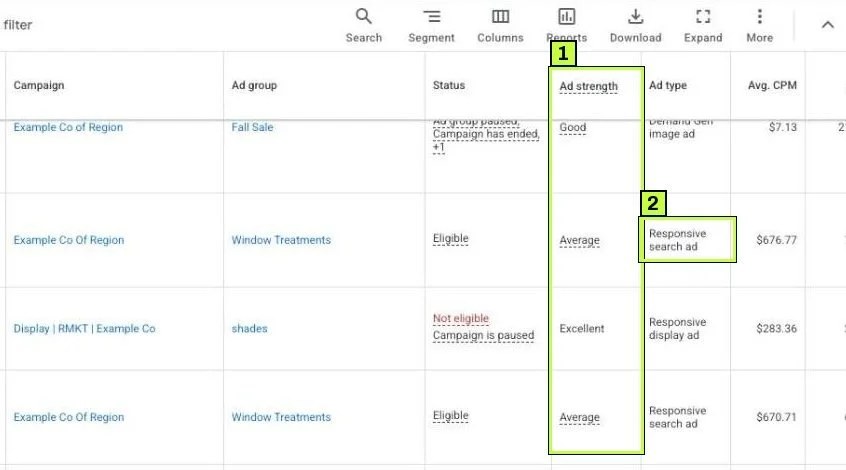
Ad strength is not Quality Score. It rates the variety and relevance of your headlines and descriptions. Still, adding distinct, keyword-focused headlines usually helps both.
Step 4: Fix low ad relevance
Ad relevance measures how well your ad matches the intent behind the keyword, and it usually drops when one ad group holds too many different ideas.
Picture an ad group called "Plumbing" with keywords for drain cleaning, water heaters, leak detection and toilet repair. One set of ads can't speak to all of them, so most keywords get a weak match.
How to fix it:
- Group keywords by theme. One ad group per service or product, with keywords that share the same intent.
- Write ads for each group. Use the group's main words in headlines and descriptions.
- Move stray keywords. If a keyword doesn't fit the ad, move it to an ad group whose ads do fit.
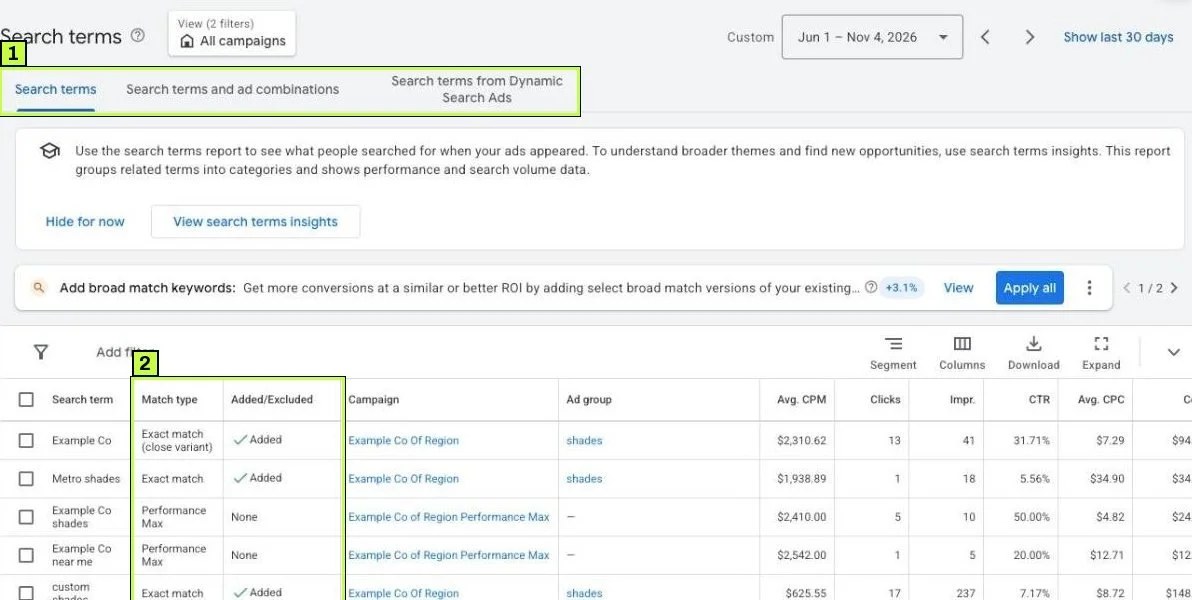
- Check the search terms report. Go to Campaigns > Insights and reports > Search terms. If broad match brings searches far from your theme, the ad can't match them. Tighten match types or add negatives.
Google's own advice is to align ad language with search terms and to split ad groups that one ad can't serve well. You don't need one keyword per ad group, because tight themes are enough for most accounts.
A simple way to plan a split is a short table before you touch the account:
| Before | After |
|---|---|
| One ad group with four different services | Four ad groups, one per service |
| One set of ads trying to cover all of them | Ads written for each service, using its words |
| Keywords that don't fit any ad | Moved to a matching group or paused |
Step 5: Fix low landing page experience
Landing page experience reflects how useful the page is for someone who clicked your ad, and Google looks at relevance, clarity and ease of use, especially on mobile phones.
Work through these checks:
- Match the page to the search. Someone who searched "water heater repair" should land on a water heater page, not your homepage.
- Show the answer quickly. The service, the offer and the call to action should be visible without scrolling on a phone.
- Keep the message consistent. If the ad says "Free estimate", the page should say it too.
- Make it fast. Slow pages hurt the experience. See Core Web Vitals fixes.
- Make it mobile-friendly. Readable text, tappable buttons, no pop-ups covering the content.
- Be transparent. Show who you are, how to contact you, and clear pricing or terms when relevant.
- Check that Google can reach the page. Broken links, redirects to unrelated pages or blocked pages cause problems.
Google mentions that conversion rate can work as a proxy for landing page quality, although it doesn't feed the landing page status directly. If a page converts poorly, it's a good place to start looking for problems.
Make sure tracking still works after page changes, because a new page without the conversion tag looks exactly like a performance drop. See Google Ads conversion tracking.
How quality affects what you pay
Google lists ad and landing page quality as one of the factors in Ad Rank, alongside your bid, Ad Rank thresholds, competition, the search context and the expected impact of assets. Higher-quality ads can clear the minimum thresholds more easily, can show in better positions, and often pay less per click for the same spot. That's why fixing a low component on a high-spend keyword usually matters more than raising its bid.
Still not working? Common causes
| Symptom | Likely cause | Fix |
|---|---|---|
| Quality Score shows — | Not enough exact searches for the keyword | Wait for more data. Judge the keyword by cost and conversions meanwhile. |
| Score didn't change after a fix | Scores update as new auction data comes in | Wait two to four weeks. Check the historical columns by day. |
| Below average landing page on every keyword | Slow or generic landing page shared across the account | Build specific pages per service. Improve load speed on mobile. |
| Ad relevance low despite good headlines | Ad group mixes many intents | Split into themed ad groups. |
| Expected CTR low for broad keywords | Broad match triggers loosely related searches | Add negatives or use phrase and exact match for core terms. |
| Score dropped after moving keywords | New ad group has different ads | Write ads for the new group that match its keywords. |
| High Quality Score but poor results | Score measures relevance, not profit | Check conversion rate and cost per conversion too. |
| Ad strength Excellent but Quality Score low | Ad strength rates ad variety, not how searches respond | Use ad strength as a writing guide. Fix the low QS component separately. |
Don't game the number
Pausing low-score keywords can raise the account average without changing anything that matters, so if a keyword with a 4 converts profitably, keep it running. Google's help says Quality Score isn't a key performance indicator and shouldn't be optimized for on its own.
Brand keywords skew the average
Your own brand terms usually score very high, so when you look at averages, separate brand and non-brand campaigns, or the brand terms hide problems elsewhere.
How to confirm it's fixed
- Right after changes: Note the date in a spreadsheet next to your baseline export.
- After 2 weeks: Add Quality Score (hist.) and the component history columns. Segment by day and look for a change in the components you worked on.
- After 4 weeks: Compare average CPC, impression share and conversion rate for the keywords you fixed. Better quality often shows as lower costs or better positions.
- Ongoing: Recheck high-spend keywords monthly. New competitors change the comparison, so scores move even when you don't.
If the components move but costs don't, check whether your bid strategy or budget changed at the same time.
FAQ
Is Quality Score used in the ad auction?
Not directly. Google describes Quality Score as a diagnostic tool, while the auction itself uses real-time quality signals that the score summarizes.
Does changing match type affect Quality Score?
No. Google calculates it from exact searches of your keyword, so switching match type doesn't change the score.
What's a good Quality Score?
There's no official target. Most practitioners aim for 7 or higher on important non-brand keywords. Focus on fixing Below average components first.
Why is my Quality Score blank?
The keyword hasn't had enough exact searches yet, and the score will appear once there's enough data.
Does ad strength affect Quality Score?
Not directly. Ad strength rates the variety and relevance of your responsive search ad assets. Better ads can raise expected CTR and ad relevance, which can then show in Quality Score.
Stuck on this one? We fix these for clients every week. Book a free audit
