You sent a newsletter, ran a few social posts and printed a QR code. In GA4, most of that traffic lands in Direct, Referral, or the worst bucket of all: Unassigned. You can't tell which campaign worked, so you can't do more of it.
UTM parameters fix this. They are small tags added to the end of a link, like ?utm_source=newsletter&utm_medium=email&utm_campaign=spring_sale. When someone clicks, GA4 reads them and records where the visit came from. But GA4 is strict. It sorts traffic into channels with fixed rules, and a medium it doesn't recognize ends up as Unassigned. Values are also case sensitive, so Email and email become two rows.
This guide shows you how to build UTM links, which values GA4 expects, how to set a naming system your whole team can follow, and how to find and fix Unassigned traffic.
Quick answer
- Always set
utm_source,utm_mediumandutm_campaign. Use lowercase and no spaces. - Pick
utm_mediumvalues that GA4's default channel rules recognize:email,cpc,social,display,affiliate,referral,sms. - Build links with Google's Campaign URL Builder or a shared spreadsheet.
- Never put UTMs on links within your own site. Keep Google Ads auto-tagging on instead of adding UTMs to Google Ads.
- To fix Unassigned, check Session source / medium for unknown mediums, correct future links, and optionally create a custom channel group.
Before you start
- Access: Viewer access to GA4 to check reports. Editor access if you want to create a custom channel group.
- A list of your channels. Newsletter, social profiles, paid social, partners, print, SMS, and so on.
- A shared place for links. A spreadsheet works fine. The goal is one source of truth.
- Time: about 40 minutes to set up the naming rules and audit current traffic.
The parameters GA4 reads
| Parameter | What it describes | Example |
|---|---|---|
utm_source |
Who sent the visit | newsletter, facebook, partner-blog |
utm_medium |
The channel type | email, cpc, social, referral |
utm_campaign |
The campaign or promotion | spring_sale_2026 |
utm_content |
Which ad, link or creative | hero_button, video_a |
utm_term |
Paid keyword (mostly for search ads) | running+shoes |
utm_id |
Campaign ID, used for cost data imports | cmp_0412 |
utm_source_platform |
The buying platform | meta_ads |
GA4 also lists utm_creative_format and utm_marketing_tactic, but Google says they aren't currently shown in GA4 reports. You can skip them.
Step 1: Learn which mediums GA4 recognizes
This is the step most people skip, and it's the reason for most Unassigned traffic. GA4 decides the Default channel group from your source and medium using fixed rules. Here are the main ones for manually tagged links:
| Channel | Rule (simplified) | Safe medium to use |
|---|---|---|
source or medium is email, e-mail, e_mail or e mail |
email |
|
| Organic Social | source is a known social site, or medium is social, social-network, social-media, sm, social network or social media |
social |
| Paid Social | source is a known social site and medium matches paid patterns (anything containing cp, ppc, retargeting, or starting with paid) |
paid_social or cpc |
| Paid Search | source is a known search engine and medium matches paid patterns | cpc |
| Display | medium is display, banner, expandable, interstitial or cpm |
display |
| Affiliates | medium is affiliate |
affiliate |
| Referral | medium is referral, app or link |
referral |
| SMS | source or medium is sms |
sms |
| AI Assistant | medium is ai-assistant; GA4 also assigns this itself to visits referred by AI assistants on Google's list |
don't tag it, let GA4 assign it |
| Paid Other | medium matches paid patterns, but the source isn't a known social or search site | cpc |
| Unassigned | nothing matched | avoid |
Channel rules aren't case sensitive, but your reports are. So Email still lands in the Email channel, but appears as a separate row from email under Session medium. Lowercase avoids that mess.
Google keeps the lists of known social, search, video and shopping sites in a spreadsheet linked from its channel group help page. Notice what's missing from the rules. Mediums like newsletter, qr, print, post, story, bio or whatsapp match no rule. If the source also doesn't match a known site, the visit becomes Unassigned.
Step 2: Set a naming convention
Write your rules down once. Share them. Here's a simple template that fits the channel rules.
| Use case | utm_source | utm_medium | utm_campaign |
|---|---|---|---|
| Monthly newsletter | newsletter |
email |
2026-11_newsletter |
| Organic Instagram post | instagram |
social |
fall_launch |
| Paid Facebook ad | facebook |
paid_social |
fall_launch |
| LinkedIn profile link | linkedin |
social |
profile |
| Partner blog mention | partner-blog |
referral |
guest_post |
| QR code on a flyer | flyer |
offline |
fall_event |
| Text message | sms |
sms |
fall_reminder |
The QR code example is a special case. There's no default channel for print. You can use referral, or keep offline and map it with a custom channel group (Step 5).
Rules that save you later:
- Lowercase only. Google recommends it, and it avoids split rows.
- No spaces. Use
_or-. A space turns into%20and looks broken. - One source name per platform. Not
fb,facebookandFacebook.comin the same month. - Campaign names that match the ad platform. That way you can join GA4 data to cost data.
- Never put personal data in UTMs. No email addresses or names.
Step 3: Build the link
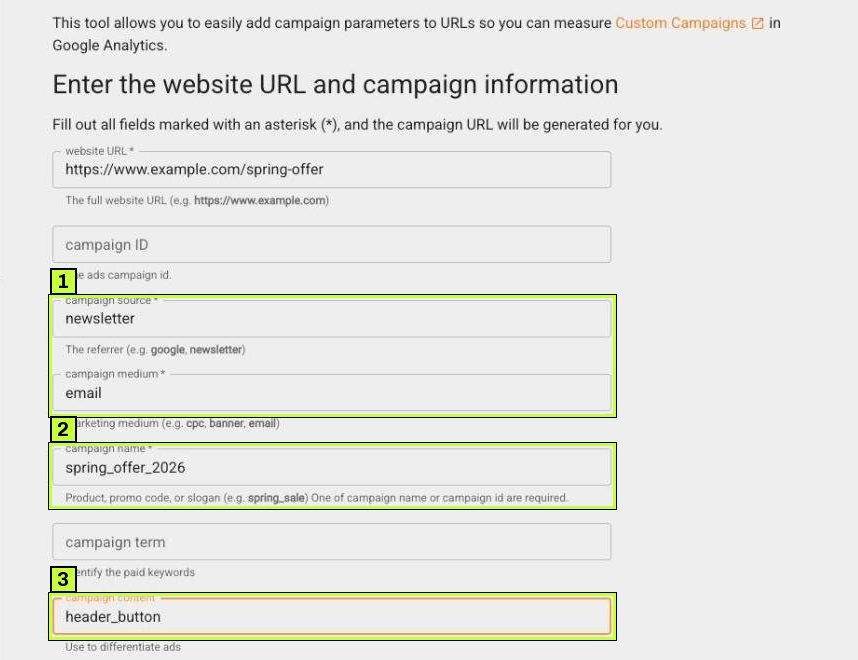
The easiest tool is Google's Campaign URL Builder at ga-dev-tools.google/campaign-url-builder/.
- Enter the website URL, such as
https://www.example.com/spring-offer. - Fill in campaign source and campaign medium. Both are required.
- Fill in campaign name. The form needs either a campaign name or a campaign ID; set the name anyway so your reports are readable.
- Add campaign content if you have several links in one email or ad, and campaign term only for paid keywords.
- Scroll down to Share the generated campaign URL and copy the generated URL with the copy icon.
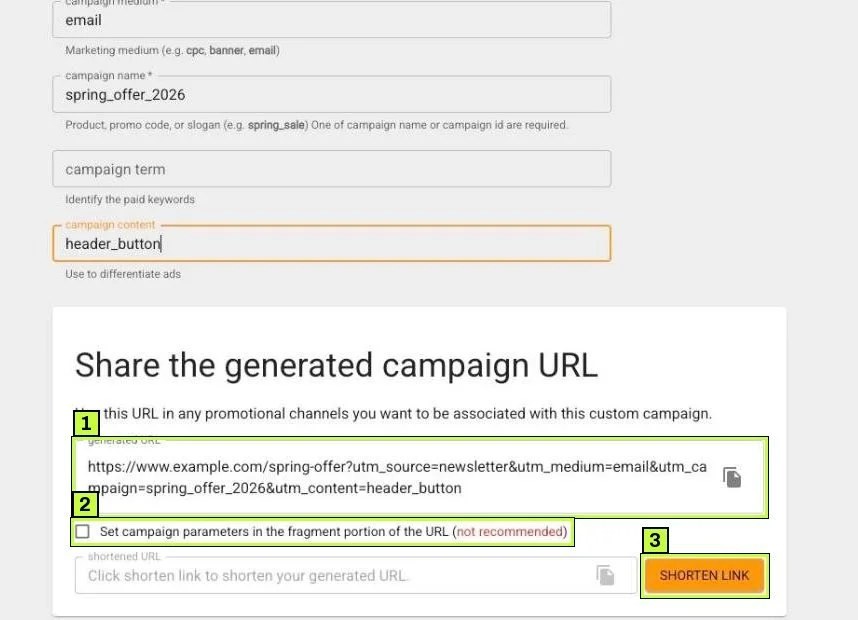
Paste the URL into your email, post or QR code generator. Notice the builder only adds parameters you filled in, in a fixed order.
If your page URL already has a ?, join the UTMs with & instead. The builder handles this for you. If your link goes through a shortener, test the short link to make sure it keeps the parameters.
For anything beyond a few links, use a shared spreadsheet with dropdowns for source and medium. A simple formula joins the parts (Google Sheets or Excel):
=A2&IF(ISNUMBER(FIND("?",A2)),"&","?")&"utm_source="&B2&"&utm_medium="&C2&"&utm_campaign="&D2
Step 4: Know where not to use UTMs
UTMs can hurt your data as much as help it.
Internal links. Never add UTMs to links from one page of your site to another, such as a homepage banner. When a visitor clicks it, GA4 records a new traffic source mid-visit and overwrites the real one. Use an event or utm-free tracking (like a click event in GTM) for internal promotions.
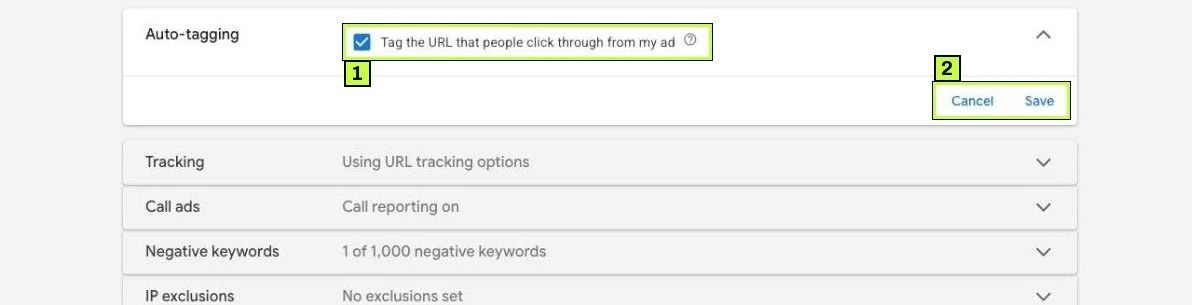
Google Ads. Keep auto-tagging on in Google Ads. It adds a gclid parameter that gives GA4 richer data, such as campaign, ad group and keyword. You don't need manual UTMs for Google Ads. If you use both, Google's data from auto-tagging normally takes priority.
Other ad platforms. Many platforms support dynamic UTMs, such as a placeholder for campaign name. Google recommends using them where available, so names stay in sync automatically.
To check it, click Admin in the Google Ads left rail, then Account settings, and expand Auto-tagging.
Step 5: Find and fix "Unassigned"
Now audit what's already happening.
- In GA4, open Reports > Acquisition > Traffic acquisition.
- The default table shows Session primary channel group (Default Channel Group). Find the Unassigned row.
- Click the + next to the dimension dropdown and add Session source / medium as a secondary dimension. Or switch the dropdown itself to Session source / medium.
- Type
unassignedin the search box, or scan the Unassigned rows for odd mediums.
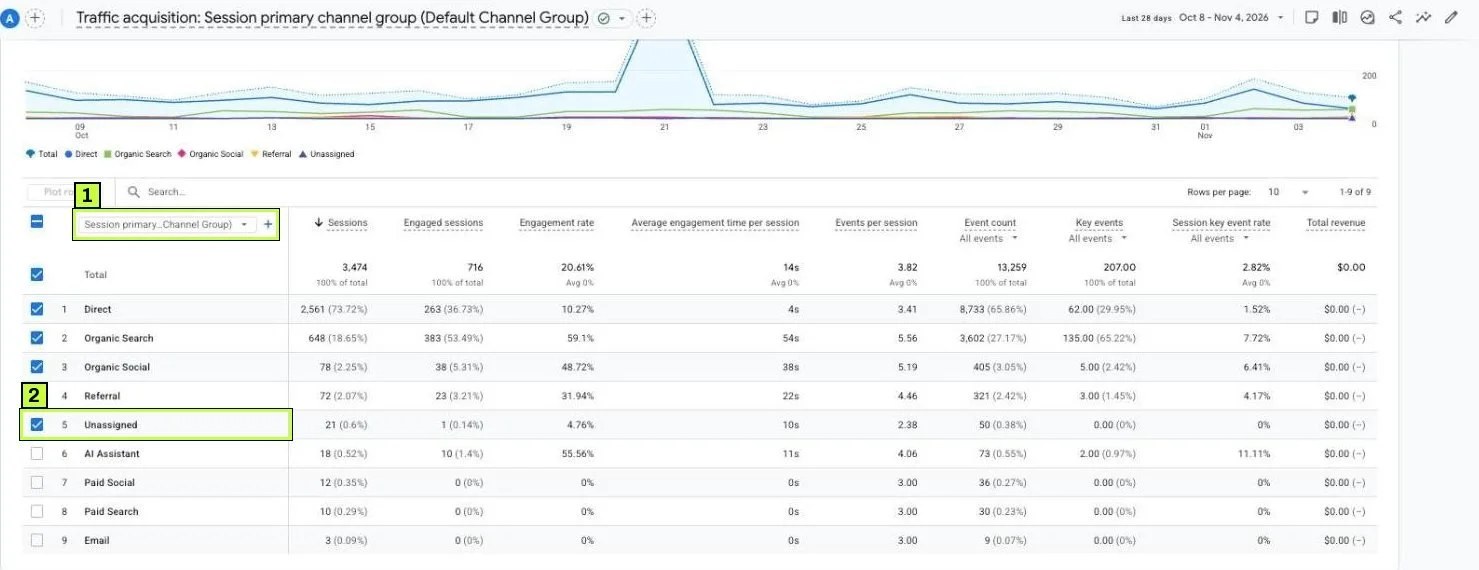
Don't read anything into the example's numbers. What matters is the method: every Unassigned row has a source and medium that explain why.
Common patterns and what to do:
| What you see | Why it's Unassigned | Fix for future links |
|---|---|---|
newsletter / newsletter |
Neither value is email |
Use utm_medium=email |
flyer / qr |
No print or QR channel exists | Use referral, or map qr in a custom channel group |
Instagram / Story |
Capitalized source may still match, but Story isn't a known medium |
Use instagram / social |
partner / partnership |
Medium unknown | Use referral or affiliate |
(not set) / (not set) |
Events with no session source, for example sent without a session_start, server-side, or by the Measurement Protocol |
Check how those events are sent. Make sure they carry session data |
You can't rewrite past data with UTMs. Past sessions stay where they were. Two options help with history:
Custom channel group. Go to Admin > Data display > Channel groups.
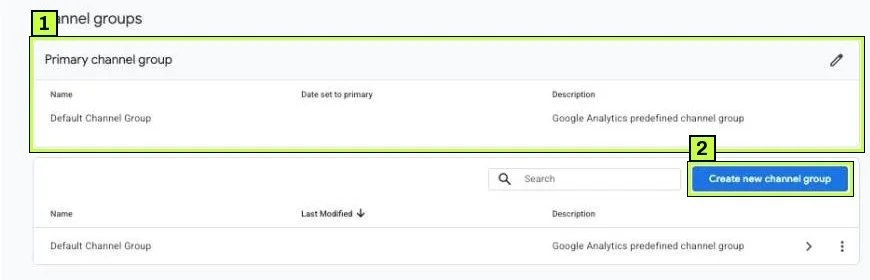
- Click Create new channel group. GA4 copies the default rules into a new group. Give it a name.
- Click Add new channel, name it (for example "Print / QR"), click + Add condition group and set Session medium exactly matches
qr. Click Save channel. - Click Reorder and drag the new channel above the rules that would catch it first. Traffic goes to the first channel it matches. Click Apply.
- Click Save group.
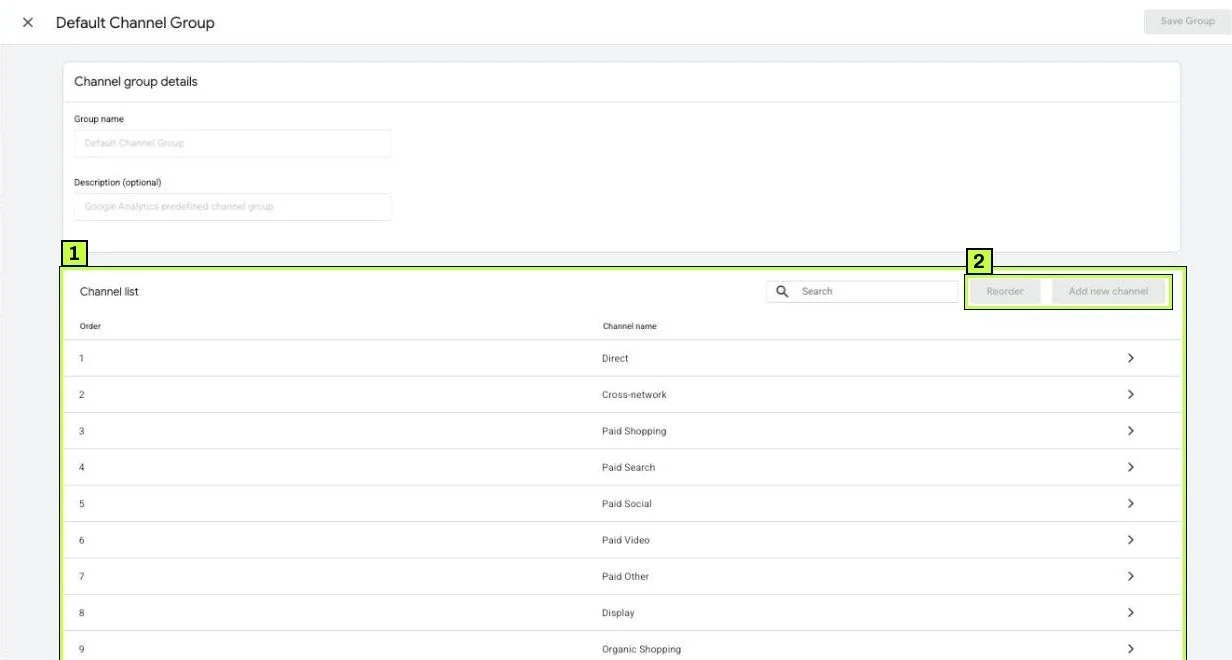
Custom channel groups apply to past data in reports, which makes them a good fix for history. A standard property allows two custom channel groups, so plan them well. To see yours, pick it from the dimension menu in Traffic acquisition or User acquisition.
Fix the links going forward. Update templates in your email tool, social schedulers and QR codes. Then retire the bad values.
Still not working? Common causes
| Symptom | Likely cause | Fix |
|---|---|---|
| UTM traffic appears as Direct | Redirect or shortener strips the query string | Test the final URL. Fix the redirect or use another shortener |
Campaign shows (not set) |
Only source and medium set, or a typo like utm_campain |
Set all three. Copy from the builder, don't type by hand |
| Same campaign split into two rows | Mixed case or spacing (Spring_Sale vs spring_sale) |
Lowercase everything. Enforce dropdowns in the sheet |
| Paid social lands in Organic Social | Medium social used for paid ads |
Use paid_social or cpc for ads |
| Paid social lands in Paid Other | Source isn't in Google's social list (for example fb_ads) |
Use a plain platform name like facebook |
| Sessions jump to a new source mid-visit | UTMs on internal links | Remove them. Use events for internal banners |
Google Ads traffic shows as google / organic or Unassigned |
Auto-tagging off, or gclid stripped by the site |
Turn auto-tagging on. Make sure the site keeps the gclid parameter |
| Unassigned keeps growing with no UTMs involved | Events without session data (server-side, Measurement Protocol) or consent-related gaps | Check those integrations. See Consent Mode v2 |
| Email clicks all show as Direct | Email app opens links in a way that drops referrer and you sent no UTMs | Tag every email link |
How to confirm it's fixed
- Click your own link in a private browser window.
- Open Realtime overview in GA4. A private window makes you a new user, so your source should show in the Active users by First user source card within a minute or two.
- Check the URL on arrival. The
utm_parameters should still be there after any redirect. - Wait 24 to 48 hours, then open Traffic acquisition with Session source / medium. Your values should appear exactly as written, lowercase, in the right channel.
- Review Unassigned monthly. New team members and new tools tend to reintroduce bad values.
For cross-domain journeys where the source gets lost between your own sites, see the cross-domain guide. For counting what those visits achieve, see GA4 key events.
FAQ
Are UTM parameters case sensitive in GA4?
The values are. utm_source=Google and utm_source=google appear as separate rows. Default channel rules ignore case, but your reports will still split. Use lowercase.
Do UTM parameters affect SEO?
Not when used on external links like emails and ads. Keep a canonical tag on your pages so any shared UTM URL points to the clean version. Don't use UTMs on internal links.
Should I add UTMs to Google Ads?
No. Keep auto-tagging on. It sends more detail than UTMs can.
What's the difference between Direct and Unassigned?
Direct means GA4 found no source at all. Unassigned means a source exists but no channel rule matched it, or session data was missing.
Can I fix old Unassigned data?
Not by changing links. A custom channel group can relabel past sessions in reports, as long as the medium or source tells you what they were.
Stuck on this one? We fix these for clients every week. Book a free audit
