You open the Page indexing report in Search Console and see a row called Crawled - currently not indexed. Some of the URLs on that list are blog posts or service pages you care about, and they aren't showing up in Google at all.
This status means Googlebot visited the page, read it and decided not to add it to the index, at least for now. Nothing technical stopped it. There's no error code, no robots.txt block and no noindex. Google simply judged the page not worth storing yet, or it hasn't finished processing it.
That makes this one different from most indexing errors. You can't flip a setting to fix it. You fix it by deciding which URLs actually deserve to be indexed, making those pages clearly useful and distinct, and cleaning up the rest so Google spends its attention on the right pages. Google's help page calls this a common message because Google doesn't index every page on the web, so expect some URLs to stay on the list and be fine with that.
Quick answer
- Open Indexing > Pages, click Crawled - currently not indexed and export the examples. Sort them into "should be indexed" and "doesn't matter".
- Inspect a few important URLs with URL inspection to rule out a reporting delay and confirm the page renders fully.
- For pages that matter, fix thin, duplicate or outdated content and add internal links from strong pages.
- For pages that don't matter, stop producing them, consolidate them with redirects or canonicals, or leave them alone.
- Request indexing for your top fixed pages, then click Validate fix and give it two to four weeks.
Before you start
You need Owner or Full user access to the Search Console property, because only those roles can request indexing. A spreadsheet tool helps for sorting the exported list. If the site runs on WordPress, Shopify or another CMS, have an editor login ready so you can update content and links.
Plan for one to two hours on a small site. Most of that time goes into reviewing pages, not clicking buttons. Before rewriting or merging anything, save a copy of the current page content, and note any URL you plan to redirect so you can roll back if traffic drops.
Step 1: Open the report and export the list
In Search Console, go to Indexing > Pages. Scroll to the table titled Why pages aren't indexed and find the Crawled - currently not indexed row. Note the Source column: it says Google systems, not Website. Google's help explains that the source tells you whether the issue comes from Google or from your site, and that you can generally fix only website-sourced issues directly. Here you can only influence Google's decision.
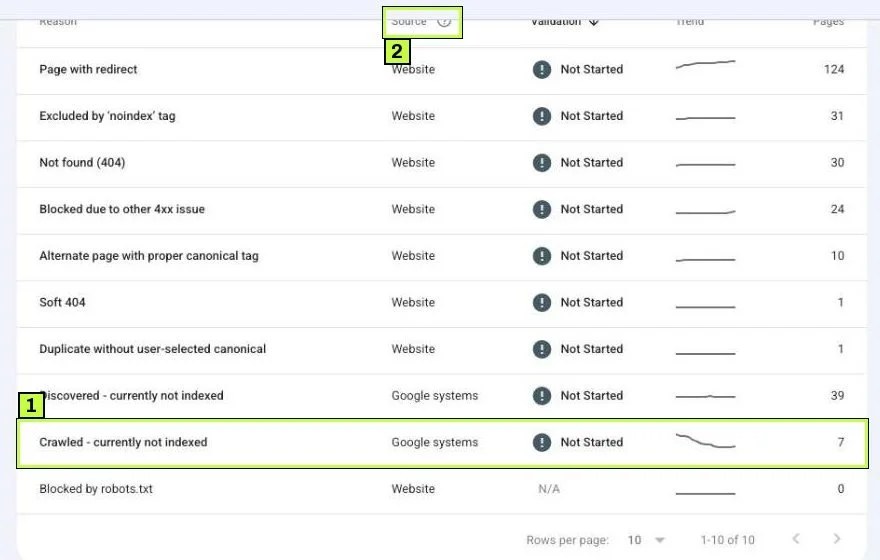
Click the row to open the detail page. At the top you'll see the reason, a First detected date, and Done fixing? next to the VALIDATE FIX button. Export sits in the top right and downloads the examples to Google Sheets, Excel or CSV.
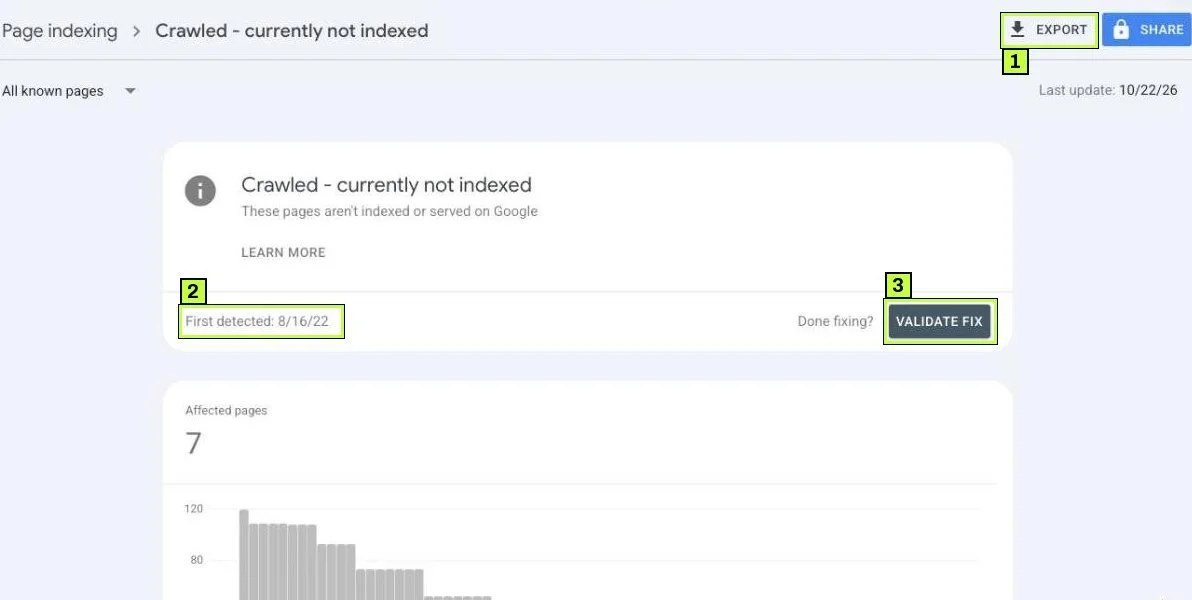
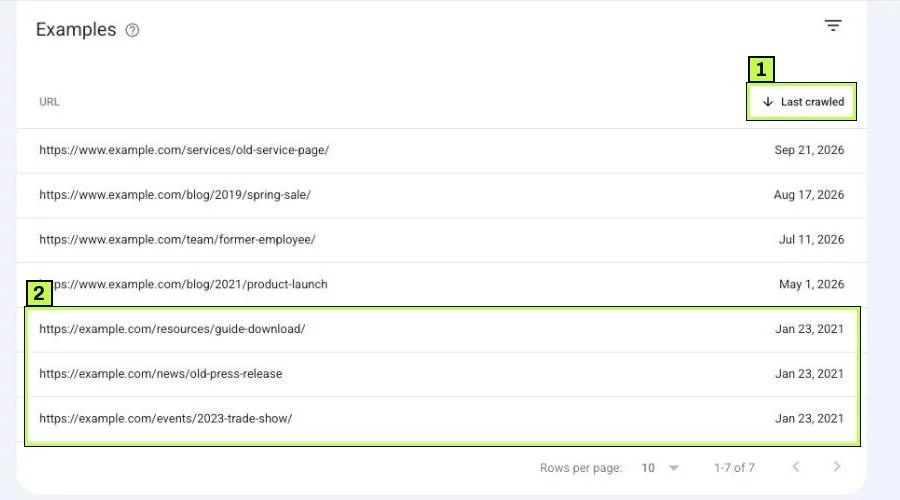
Further down, the Examples table lists URLs with a Last crawled date. Google's help says this list doesn't necessarily show every affected URL and is capped at 1,000 rows. That's fine for spotting patterns.
Step 2: Sort the URLs into groups
Open the export and add a column called "Group". Go down the list and tag each URL. You'll usually find the URLs fall into a few buckets.
| Group | Examples | What to do |
|---|---|---|
| Important pages | Service pages, product pages, cornerstone posts | Improve and relink (Steps 3 to 5) |
| Near-duplicates | Tag pages, filtered category URLs, location pages with swapped city names | Consolidate or canonicalize |
| Technical leftovers | Feeds (/feed/), ?replytocom=, paginated archives, search result pages, attachment pages |
Stop linking or generating them; ignore |
| Old or expired | Past events, sold-out products, outdated news, former staff pages | Update, redirect or return 404/410 |
| Files | PDFs, images, JSON or XML URLs | Usually fine to leave as is |
Be honest in this step. A list where most rows are WordPress feeds and tag archives isn't a problem. Those pages don't need to rank. The handful that matter are your real task.
Sort by URL path to see patterns quickly. If you see the same template over and over, the fix belongs at the template level, not page by page.
Step 3: Inspect your important URLs
Take three to five URLs from the "Important pages" group and paste each one into the bar at the top of Search Console that reads Inspect any URL in your property.
Check three things here.
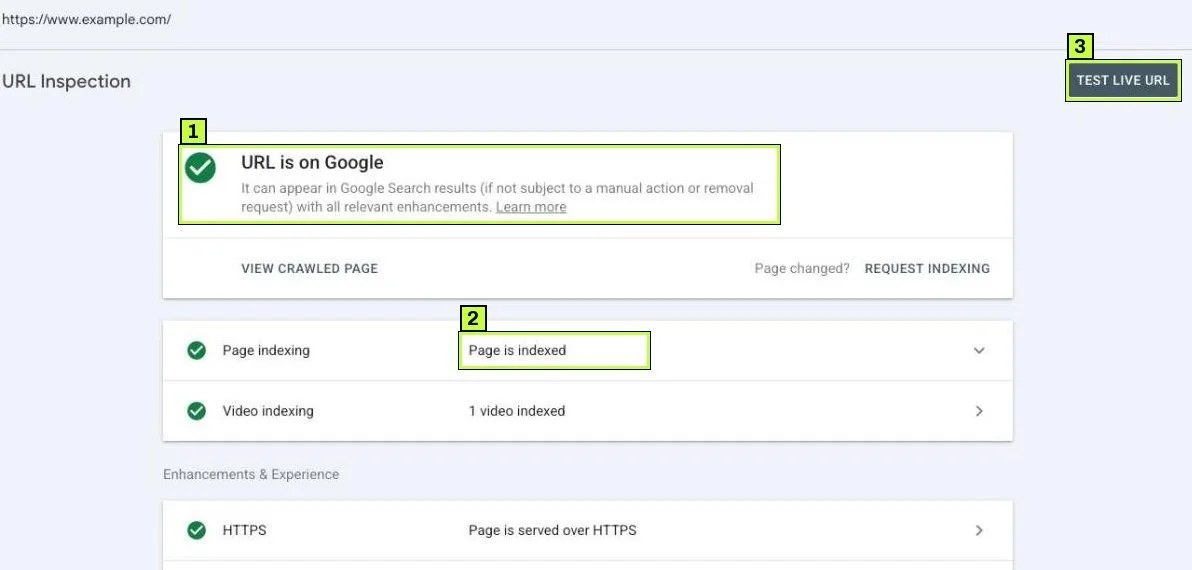
Is it already indexed? The Page indexing report updates more slowly than URL inspection. If the result says URL is on Google, the report is just behind and you can move on.
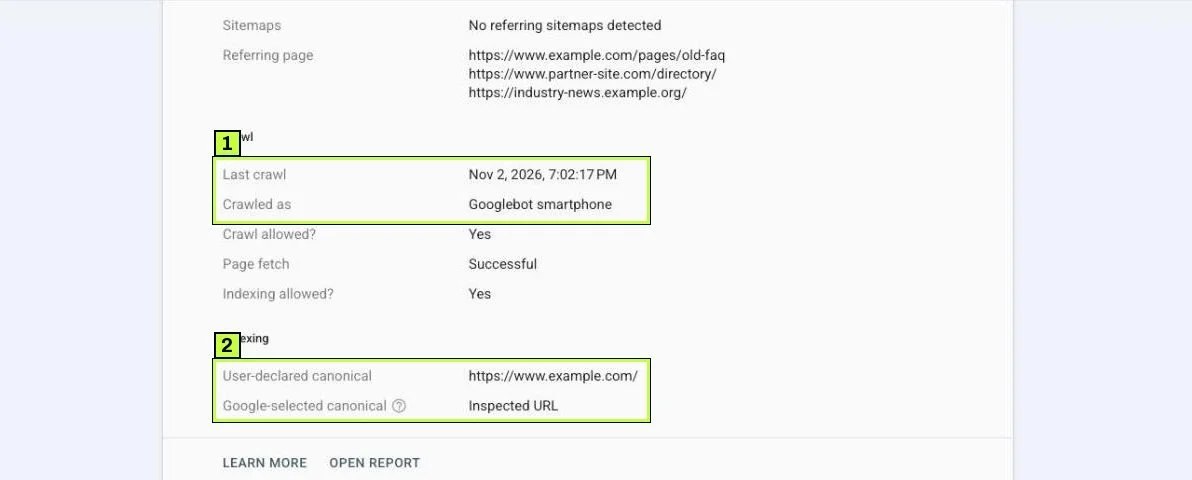
When was it last crawled? Expand Page indexing and look at Last crawl and Crawled as (usually Googlebot smartphone). If the date is before your last big edit, Google judged an older version of the page.
Does the page render fully? Click Test live URL, then View tested page. Look at the screenshot and the rendered HTML, and check More info for page resources that couldn't load and JavaScript console messages. If your main content loads through JavaScript and the HTML shows an empty shell like this, Google may be seeing a thin page:
<body>
  <div id="app"></div>
  <script src="/bundle.js"></script>
</body>
That's a rendering problem. Your developer needs to serve the main content in the initial HTML, or fix the script errors and blocked resources that More info lists.
Is there a canonical? If User-declared canonical says None, add a self-referencing canonical tag. It won't force indexing, but it removes one source of doubt about which URL you want. If Google-selected canonical shows a different URL, you're looking at a duplicate issue instead; see our canonical guide.
Step 4: Improve the pages that should be indexed
This is the real fix. Google's helpful content guidance asks whether a page offers original, substantial value compared with other pages, including other pages on your own site. Go through each important page with these questions.
Is the page thin?
A service page with 80 words and a contact form doesn't give Google much to work with. Add the information a buyer actually needs: what's included, who it's for, how the process works, common questions, pricing ranges if you publish them, and proof such as case details you're allowed to share. Write for a person deciding whether to hire you, not for a keyword count.
Does it overlap with another page?
Two blog posts that answer the same question compete with each other, and Google may keep only one. Pick the stronger page, merge the useful parts of the weaker one into it, and 301-redirect the weaker URL to the stronger one. Our guide on duplicate and canonical issues covers how to choose.
Is it a template with a word swapped?
Location or product-variant pages that differ only by a city name or color usually end up here. Either give each page genuinely unique content (local details, specific inventory, real photos) or combine them into one page.
Is it outdated?
Old posts with broken links, past dates and stale advice look low value. Update the facts, refresh the examples and change the visible "updated" date only when you've made real changes.
Is the main content visible in the HTML?
If Step 3 showed missing content in the rendered HTML, fix that first. Content Google can't see doesn't count.
Step 5: Strengthen internal links
Google uses links to find pages and to understand which ones matter. A post that's only reachable through page 9 of your blog archive sends a weak signal.
For each important page:
- Link to it from your homepage, main menu or a hub page where it fits naturally.
- Add contextual links from two or three related, already-indexed posts, using descriptive anchor text instead of "click here".
- Make sure it's listed in your XML sitemap, and that the sitemap only lists URLs you want indexed.
- Remove internal links that point at junk URLs from Step 2, such as tag pages you've decided not to keep.
<!-- Weak -->
<a href="/services/seo-audit/">Click here</a>

<!-- Better -->
<p>Before a redesign, we run a <a href="/services/seo-audit/">technical SEO audit</a>
to find pages that search engines can't reach.</p>
Step 6: Clean up the low-value URLs
You don't need every URL indexed. For the "doesn't matter" groups, pick the lightest fix that stops them from distracting Google.
| URL type | Suggested action |
|---|---|
| Tag and author archives on a small blog | Set to noindex in your SEO plugin, or stop linking to them |
Internal search results (/?s=) |
Don't link to them; noindex the template |
Old feed URLs (/feed/) |
Leave alone; they're common and harmless |
| Expired events or products with no replacement | Return 404 or 410 |
| Expired items with a close replacement | 301-redirect to the replacement |
Parameter variants (?sort=, ?color=) |
Canonical to the clean URL; avoid linking to parameters |
Don't block these URLs in robots.txt as a first move. Blocking stops Google from seeing your canonical or noindex tags, and you can end up with Indexed, though blocked by robots.txt instead. See fixing robots.txt and noindex issues for when blocking makes sense.
Step 7: Request indexing and validate
Once your important pages are updated, inspect each one again, run Test live URL, and click Request indexing. Only do this for a handful of top pages. Google sets a daily limit per property, and its recrawl docs say repeat requests for the same URL won't get it crawled faster.
Then go back to the Crawled - currently not indexed detail page and click Validate fix once. Google's help says not to click it again until validation succeeds or fails. The validation status moves through these states:
| Status | Meaning |
|---|---|
| Not started | Some instances have never been part of a validation request |
| Started | Validation is running and no remaining instances have been found yet |
| Looking good | Every instance checked so far is fixed |
| Passed | All known instances are gone, or the URLs are no longer available |
| Failed | Enough pages still have the issue after you clicked Validate |
Because this status is a quality judgment, validation can end as Failed even when your important pages got indexed. That happens because junk URLs you chose to leave alone are still on the list. Judge success by your important pages, not by the validation badge.
Still not working? Common causes
| Symptom | Likely cause | Fix |
|---|---|---|
| New blog posts land here every time | Posts are short, similar to each other, or poorly linked | Publish fewer, deeper posts; link each from related posts and a hub page |
| Whole category of product pages affected | Thin descriptions copied from the manufacturer | Write original descriptions, add specs, FAQs and real photos |
| Pages were indexed, then dropped into this status | Google re-evaluated quality, or a similar page now covers the topic | Refresh the content, check for overlap, consolidate |
| Live test screenshot is empty or partial | JavaScript rendering fails or resources are blocked | Fix script errors; don't block CSS or JS in robots.txt |
Mostly ?page=2, /feed/, /tag/ URLs |
Normal CMS by-products | Ignore or noindex; stop linking where you can |
| Count grows after a site migration | Old URLs still reachable without redirects | Add 301 redirects to the new URLs |
| Important page stuck for months despite fixes | Few internal or external links, site-wide quality concerns | Link it from your strongest pages; prune or improve weak sections of the site |
| Many pages on a young site affected | Site has little authority yet | Focus on fewer, stronger pages; earn real links over time |
When the problem is site-wide
If most of your site sits in this bucket, look past single pages. A site with hundreds of thin or auto-generated pages makes it harder for Google to trust the rest. Pruning weak sections (merging, improving or removing them) often helps the remaining pages get indexed. Take it slowly, and keep anything that gets traffic or links.
When it's a Discovered problem in disguise
If Last crawled shows a date months or years ago and the page has changed a lot since, Google may not have seen your updates. Request indexing and make sure the page is in the sitemap with an accurate lastmod date. If Google isn't crawling at all, see Fix "Discovered – currently not indexed".
How to confirm it's fixed
- Re-inspect each important URL one to two weeks after requesting indexing. Look for URL is on Google and Page is indexed on the Page indexing row.
- Check the Last crawl date. It should be after your changes went live. If it isn't, Google hasn't seen the new version yet.
- Watch the Indexed tile in Indexing > Pages over two to four weeks. You want your important pages to move into indexed, even if the total not-indexed count barely changes.
- Open Performance > Search results, filter by page and confirm impressions start appearing for the fixed URLs.
- Follow the validation status, keeping in mind that Failed can just mean leftover low-value URLs.
Google's help says validation typically takes up to about two weeks but can take longer. Content changes can take a few weeks to be reflected, so don't rewrite the same page again after three days.
FAQ
Is "Crawled – currently not indexed" a penalty?
No. It's not a manual action or penalty. It means Google decided not to index the page for now. Manual actions show in their own report under Security & Manual Actions.
Should I keep clicking Request indexing?
No. One request after a real change is enough. Repeat requests don't speed up crawling, and Google won't index a page just because you asked again.
Can pages leave this status on their own?
Yes. Google may index them later, especially once they gain links or the site grows. Some URLs also come and go between indexed and not indexed over time.
Does word count matter?
Not as a target. What matters is whether the page answers the visitor's question better than other pages do. Some short pages index fine; some long ones don't.
Should I delete every page on this list?
No. Delete or redirect only pages that are truly useless or duplicated. Many URLs on this list are harmless by-products, and deleting good pages can cost you traffic.
Stuck on this one? We fix these for clients every week. Book a free audit
Sources
- support.google.com: /webmasters/answer/7440203
- support.google.com: /webmasters/answer/9012289
- developers.google.com: /search/docs/fundamentals/creating-helpful-content
- developers.google.com: /search/docs/crawling-indexing/consolidate-duplicate-urls
- developers.google.com: /search/docs/crawling-indexing/ask-google-to-recrawl
