You search for your own keyword and your ad isn't there. Or the campaign shows Limited by budget next to its status, and clicks dried up halfway through the day. Both feel urgent, but they usually have ordinary causes that you can find in a few minutes.
An ad can fail to show for many reasons. The account may have a billing problem, the ad may be disapproved, the keywords may have too little search volume, or your Ad Rank may be too low to enter the auction. And sometimes the ad is running fine, just not for you: Google stops showing it to people who keep searching without clicking.
Limited by budget is different. It means the campaign is eligible and showing, but the daily budget runs out before it can enter every auction it could win. The fix there is about money and focus, not settings.
This guide gives you a fixed order of checks: start at the top, stop when you find the problem, and apply the fix that matches it.
Quick answer
- Check the account: billing, policy issues and verification. Ads don't run while the account is suspended or unpaid.
- Check statuses at every level: campaign, ad group, ad and keyword. Look for Paused, Not eligible, Eligible (Limited) and the reason line under each status, such as Some ads disapproved or Rarely shown (low Quality Score).
- Run Ad preview and diagnosis for your keyword and location instead of searching Google yourself.
- Add the Search lost IS (budget) and Search lost IS (rank) columns. Budget losses need more budget or tighter focus. Rank losses need better bids or quality.
- For Limited by budget, raise the budget, move budget from weaker campaigns, or narrow keywords, locations and schedule.
Before you start
You need a few things before you start clicking around.
- Access: Standard or Admin access to the Google Ads account. Billing checks need billing access too.
- Time: About 30 minutes for the checks below.
- A keyword and a location to test: Pick the exact search you expected your ad to show for, and the city where you looked.
- A note of recent changes: New bid strategy, budget cuts, new ads or a paused campaign. Look at Change history if you're not sure.
Don't make big changes until you know the cause, because changing budgets and bid strategies repeatedly resets learning and makes diagnosis harder.
Step 1: Rule out account-level blocks
Start with the account, because nothing else matters if the ads can't serve at all.
Look at the top of any page in Google Ads. Red or yellow banners point to account problems: a declined payment, a policy suspension, or advertiser verification that isn't complete.
Then open Billing > Summary. The cards at the top show your Balance, the Next automatic payment and the Last payment, with the card on file. Check that a valid payment method is listed and that the last payment didn't fail. Billing activity in the left menu lists every charge and payment. If you use monthly invoicing or prepay, make sure the balance or budget order hasn't run out.
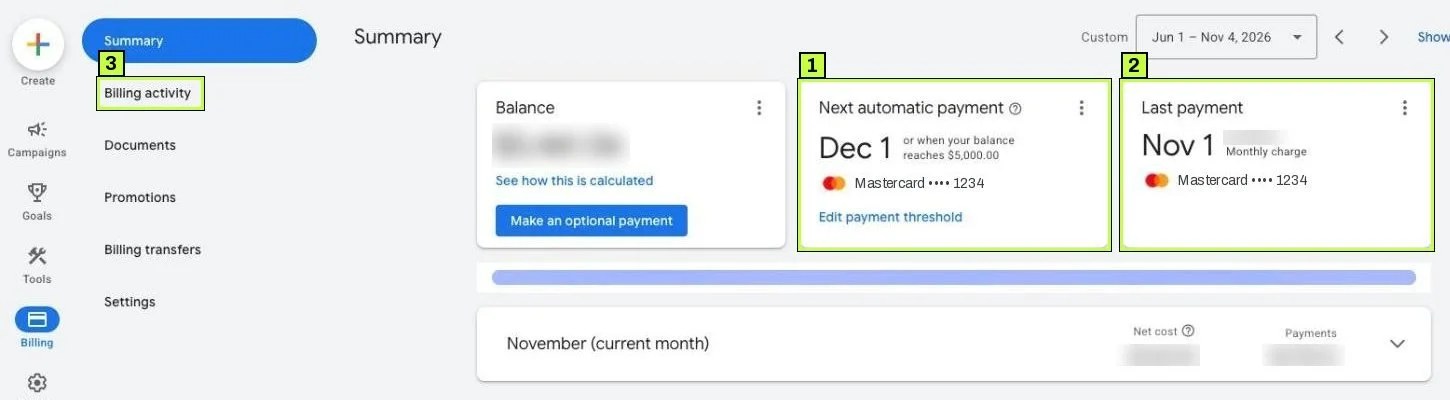
Policy problems live elsewhere: Admin > Policy > Summary lists account and ad policy issues, and Admin > Account settings shows the Account status row. Google's help is clear here: ads don't run during billing verification or a temporary security suspension, so fix these before anything else.
Step 2: Check statuses at every level
Go to Campaigns > Campaigns and look at the Status column. Google's help lists these campaign statuses:
| Status | What it means |
|---|---|
| Eligible | Running and able to show ads. |
| Eligible (limited) | Running, but showing ads only occasionally, for example because of the budget or a restrictive bid strategy. |
| Not eligible | No active ad groups, or all its ad groups, ads or keywords are paused or removed. |
| Paused | You paused it. |
| Pending | The start date is in the future. |
| Ended | The end date passed. |
| Removed | Deleted. |
In the current interface, many statuses carry a second, dotted-underlined line with the reason, such as Some ads disapproved or Bid strategy learning. Hover over it for details. Budget limits show as Limited by budget or under Eligible (limited), depending on the account.
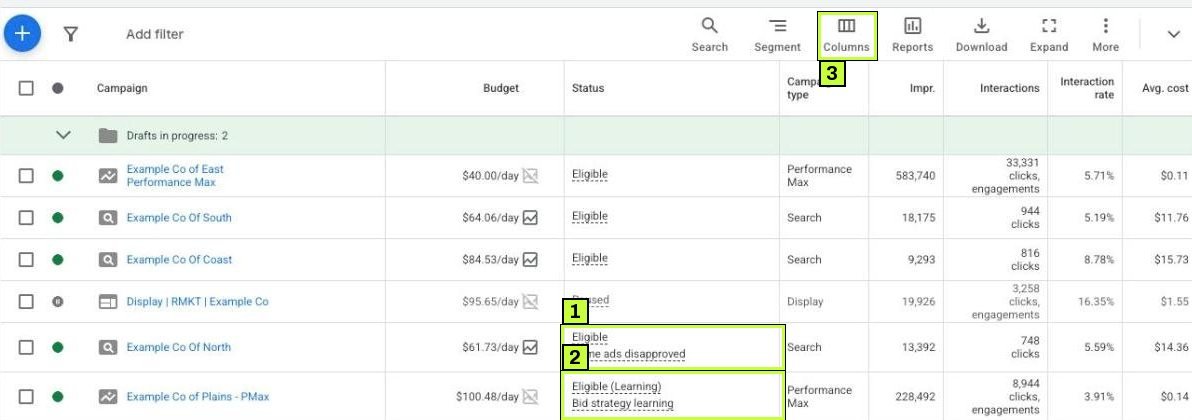
Then drill down. Under Campaigns you'll find Ad groups and Ads. Keywords sit under Audiences, keywords, and content > Keywords. A campaign can be Eligible while every ad inside it is disapproved.
At the keyword level, look at the reason line. Rarely shown (low Quality Score) means the keyword seldom enters auctions; see Quality Score for fixes. Low search volume means Google holds the keyword back until searches pick up, so add broader or more common variations. Campaign is paused under Not eligible is self-explanatory, but easy to miss when you filter by keyword.
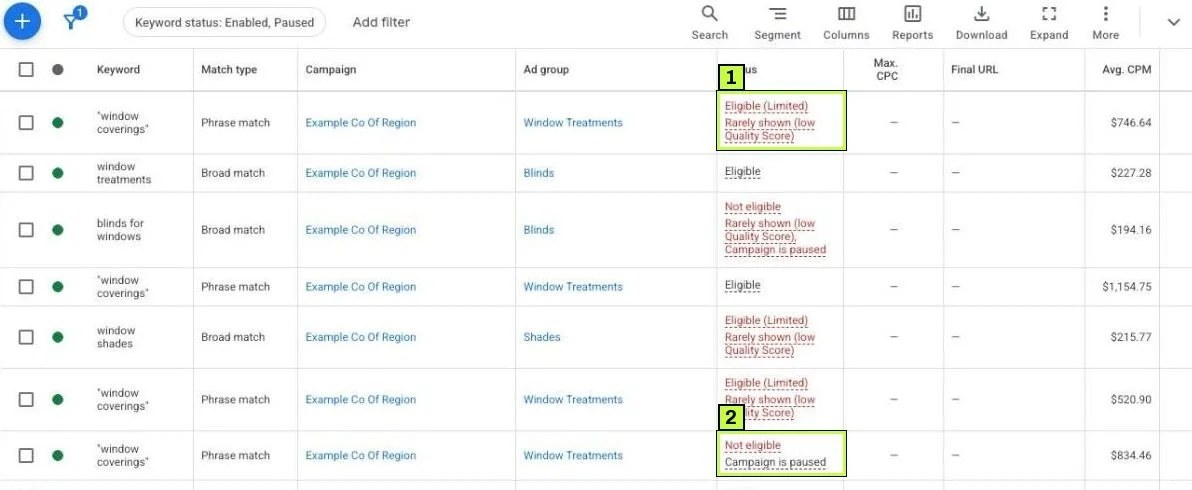
Also check the bid strategy status. Learning, Limited or Misconfigured explain a lot. Google's help says Misconfigured shows when a conversion-based strategy doesn't have the right conversions. See Google Ads conversion tracking if that's the case.
Step 3: Use Ad preview and diagnosis, not Google search
Searching your own keyword over and over doesn't work as a test. If you see your ad and never click, Google may stop showing it to you, and you also add impressions that skew your data.
Use the tool instead: go to Tools > Troubleshooting > Ad preview and diagnosis.
Type the search term in the search box. Then set Location (click the pencil), Language, Device and Audience to match the customer you care about. A banner tells you whether your ad would appear, for example Your ad isn't showing. The Results tab gives the diagnosis, and the Preview tab shows a simulated results page for the device you picked. Share creates a link to the same test.
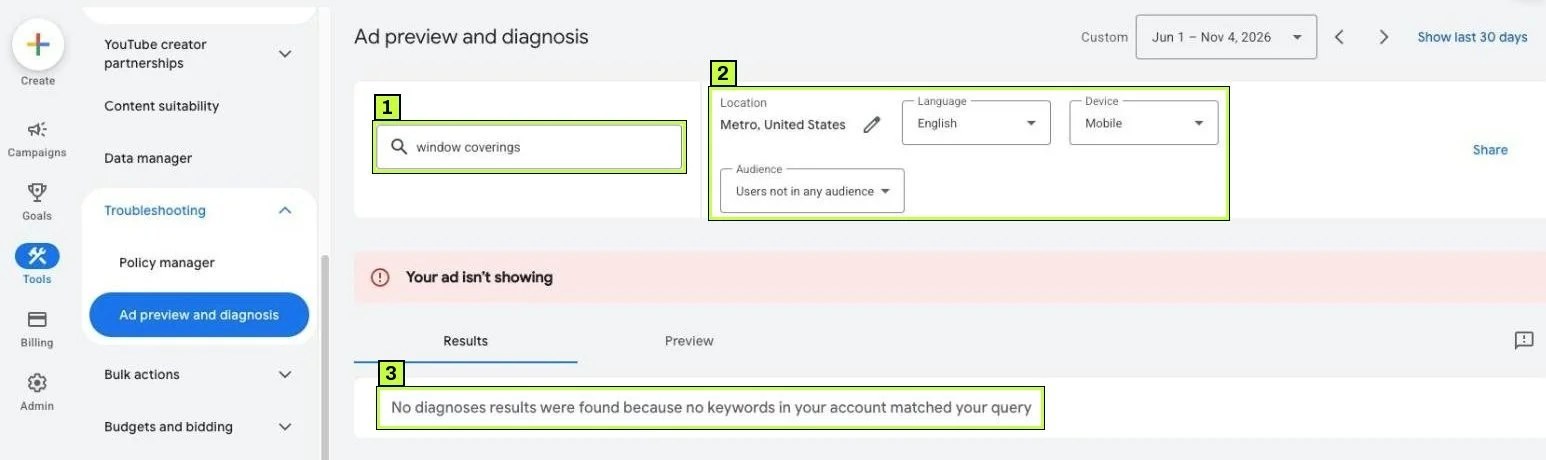
Reasons you may see include:
- No keyword in the account matches the search (as in the example above).
- Your ad group is paused or the ad isn't approved.
- Another ad in your own account won the auction for that search.
- A negative keyword blocks the search.
- Your bid or Ad Rank is too low.
- The ad is outside its ad schedule or location targeting.
The exact wording of each diagnosis varies. Google notes that its results can change over time, so compare its answer with real impressions in your reports.
Step 4: Read impression share to split budget from rank
Now look at how many auctions you're missing, and why. Go to Campaigns > Campaigns, click Columns above the table, open the Competitive metrics group (labels can vary slightly), and add:
- Search impr. share: the share of eligible impressions you got.
- Search lost IS (budget): the share you lost because the budget ran out.
- Search lost IS (rank): the share you lost because of low Ad Rank (bid and quality).
These three add up to roughly 100%, and the split tells you which fix to use.
- High lost IS (budget): you're Limited by budget. Go to Step 5.
- High lost IS (rank): your bids or quality are too low. Improve Quality Score, raise bids, or relax a strict target CPA.
- Both low, impressions still low: demand is small. Add keywords or broaden match types or locations.
Look at a period of at least two weeks, since daily numbers jump around too much to read.
Here's how to read a made-up example:
| Campaign | Search impr. share | Search lost IS (budget) | Search lost IS (rank) | What it tells you |
|---|---|---|---|---|
| Campaign A | 38% | 49% | 13% | Budget is the main limit. |
| Campaign B | 91% | 0% | 9% | Healthy. Little left to gain. |
| Campaign C | 22% | 6% | 72% | Bids or quality are the limit, not money. |
Step 5: Fix "Limited by budget"
First, understand how budgets work. Google says a campaign can spend up to twice its average daily budget on a given day, but you won't be billed more than 30.4 times the daily budget over a month. So one expensive day isn't a bug, and you don't need to fix it.
Now choose the fix that fits your situation.
Option A: Raise the budget
If the campaign is profitable, this is the simplest fix. Google's help says to filter campaigns by the Limited by budget status, then click the small chart icon next to the campaign's amount in the Budget column. A pop-up shows daily budget options. Pick one or enter your own amount, then apply it.
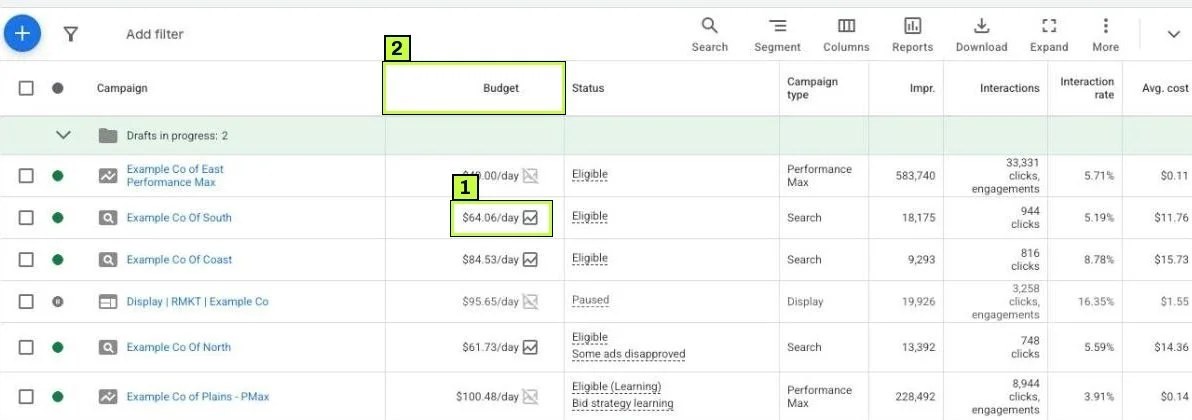
Google won't always show a recommendation. It skips one when you rarely reach the budget or when the campaign has little data. In that case, raise the budget yourself to an amount you're comfortable with.
Option B: Move budget between campaigns
Look at cost per conversion by campaign, then lower the budget of a weak campaign and raise the limited one by the same amount. Your total daily budget stays the same.
Option C: Spend the same budget more carefully
If you can't add money, shrink what the campaign tries to cover:
- Pause keywords that spend without converting.
- Add negatives from the search terms report. See negative keywords.
- Narrow locations to where you actually serve customers.
- Limit the ad schedule to hours when leads convert or the phone is answered.
- With Maximize clicks, set a Maximum CPC bid limit so clicks cost less.
- With Target CPA or Target ROAS, a stricter target can reduce spend, but it can also lower volume.
A small budget spread across many broad keywords runs out early in the day, while focused campaigns stay visible for longer.
Treat any recommendation as an option, not an order. Check profitability first, and avoid changing the budget every day.
Still not working? Common causes
| Symptom | Likely cause | Fix |
|---|---|---|
| No ads at all, every campaign | Billing problem, suspension or unfinished verification | Check the account banners and Billing. Complete verification. |
| Campaign Eligible, no impressions | All ads disapproved or keywords have Low search volume | Fix policy issues. Add common keyword variants. |
| Ad shows in preview tool but not for you | You searched it often without clicking, or you're outside targeting | Stop searching manually. Trust the tool and reports. |
| Impressions dropped after a bid strategy change | Bid strategy is Learning | Wait a week or two before judging. Don't stack changes. |
| Search lost IS (rank) high | Low bids, low Quality Score or strict target CPA/ROAS | Raise bids or targets gradually. Improve ads and landing pages. |
| Budget spent by noon | Budget small for the keyword set or CPCs | Narrow keywords and locations, or schedule ads for peak hours. |
| Ads only in some locations | Location option set to presence or interest | Under location options, choose Presence if you only serve people there. |
| Ad missing for one search | A negative keyword or another ad group wins | Check negatives and overlapping keywords in the preview diagnosis. |
| Not eligible campaign | No active ad groups, ads or keywords | Enable at least one ad group with an approved ad and keywords. |
| Ads stopped at month end | Account budget or budget order exhausted | Add a new budget order or raise the account budget. |
The bid strategy is waiting for conversions
Target CPA and Target ROAS need conversion data, so if conversion tracking broke, the bid strategy may barely bid. Check the Tracking status column in Goals > Conversions > All conversions first. No recent conversions on your main action is a red flag.
Your schedule or location excludes you
Check the campaign Settings first. If ads only run on weekdays from 9 to 5, they won't show at 8 p.m. If you target one city, someone searching from another city won't see them.
How to confirm it's fixed
- Same day: Run Ad preview and diagnosis again for the same search. The ad should show or the diagnosis should change.
- Within 24 hours: Impressions appear in the Campaigns view after fixing billing, statuses or disapprovals.
- After 7 days: Search lost IS (budget) should drop if you raised the budget or narrowed focus. Compare the same days of the week.
- After 2–3 weeks: For bid strategy changes, judge performance only after learning ends.
If impression share stays the same after a budget increase, the limit wasn't really budget. Go back to Step 4 and look at rank.
FAQ
Is "Limited by budget" always bad?
No. It just means more traffic is available at your current bids. If your current spend is the maximum you can afford, being limited is fine. In that case, focus the budget on what converts.
Why did Google spend more than my daily budget?
Google can spend up to twice the average daily budget on some days. It balances out over the month, and you won't be billed more than 30.4 times your daily budget in a month.
Should I search for my own ad to check it?
No, use Ad preview and diagnosis instead. Repeated searches without clicks can make Google stop showing you the ad, and they add impressions to your reports.
Why does my ad show on mobile but not desktop?
Check device bid adjustments, the ad preview device setting, and whether the ad schedule or audience differs. With Smart Bidding, Google may bid lower on devices that convert less.
How long after a fix do ads start showing?
Billing and status fixes usually take effect within hours. Policy reviews can take a day or more. Bid strategy changes take a week or two to stabilize.
Stuck on this one? We fix these for clients every week. Book a free audit
Sources
- support.google.com: /google-ads/answer/6385220?hl=en
- support.google.com: /google-ads/answer/1722131?hl=en
- support.google.com: /google-ads/answer/2549115
- support.google.com: /google-ads/answer/7378077
- support.google.com: /google-ads/answer/148778?hl=en
- support.google.com: /google-ads/answer/2375423?hl=en
- support.google.com: /google-ads/answer/1704363?hl=en
